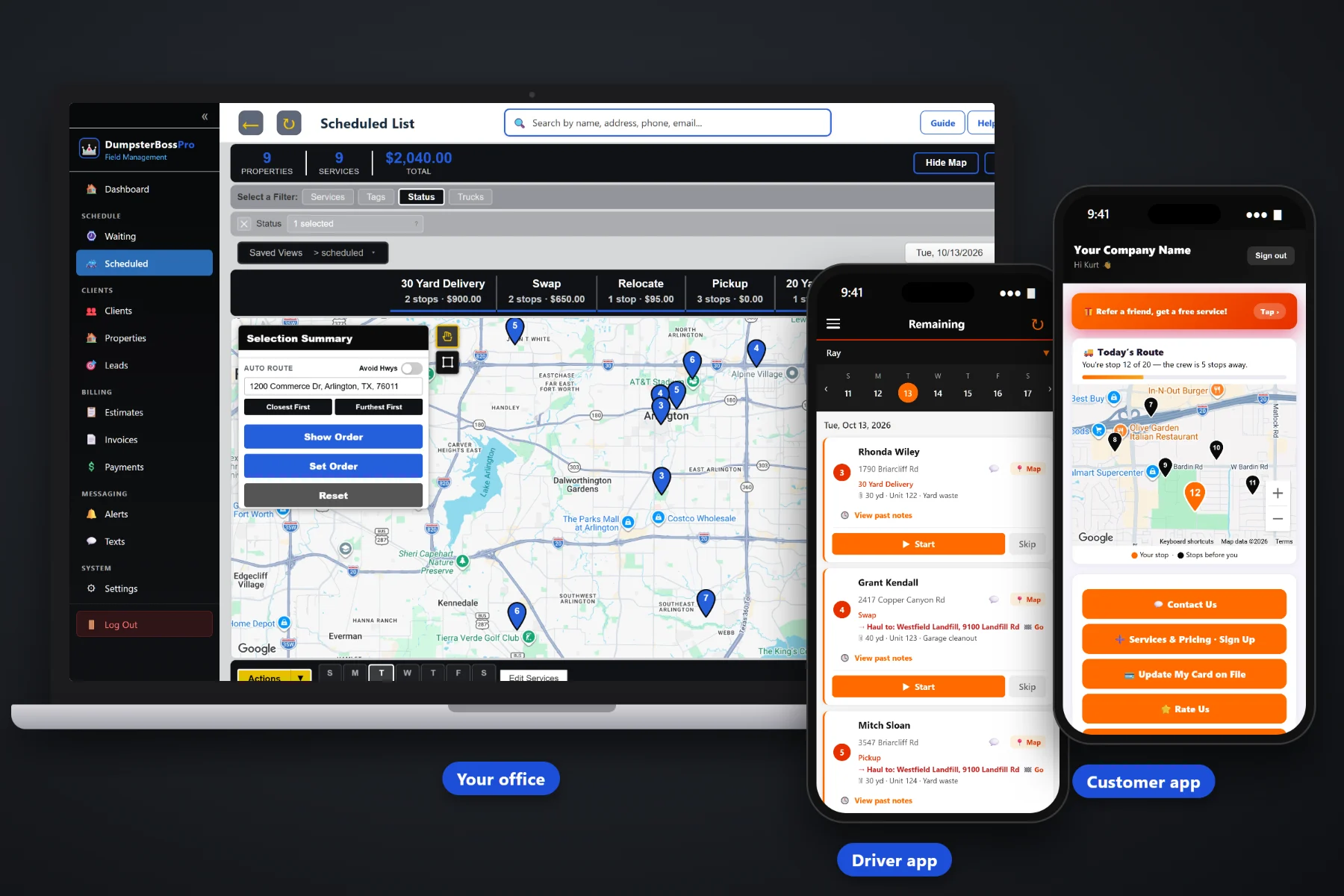
Deliveries get booked days ahead. Pickups show up whenever the customer is done, with no date and a can that is suddenly in the way. DumpsterBossPro puts every pickup, swap, dump & return and relocate request on a live waiting list map, lets you circle nearby requests and assign them to a driver and roll-off truck in one step, sends each load to the right landfill or transfer station, bills extra rental days and overweight tons automatically, and texts the customer when the truck is on the way.
“We're done, come get it” arrives by phone, text, app and web form, at random times, scattered across your area. DumpsterBossPro keeps every request, every truck run, every rental clock and every customer update in one place, at a flat monthly price that is never billed per user. New here? Start with Dumpster Pickup Scheduling Software: The Complete Guide for Roll-Off Companies.
Every open pickup, swap and delivery request sits on a live map, so you see the clusters before you decide which truck goes where.
Circle nearby pickups on the map or select them, then assign them to a driver and roll-off truck in one step. They land in route order.
The customer site and the landfill or transfer station are both on the job and both one tap away in the driver app.
Delivery date, pickup date, days included and a daily rate after that. Extra days land on the invoice automatically when the can comes off.
Enter the scale-ticket tons on the job and tons over the included weight are billed per ton on the invoice.
One-tap on-the-way and arrival texts and a live driver map in the customer app end the “when are you coming?” calls.
Most dry runs start at intake: the wrong can on a contractor's second site, a swap booked as a pickup, a car parked against the can, a gate code nobody wrote down. DumpsterBossPro puts everything the driver needs on the job itself, so the office captures it once and the driver sees it on the way.
Nobody has time for a long rollout in busy season. DumpsterBossPro follows the way a pickup actually runs: take the request, build the run, update the customer, dump it and get paid.
By phone, two-way text, the customer app or a web request form. Job type, can details and access notes go on the job, and it drops onto the waiting list map.
Circle nearby pickups and swaps, assign them to a driver and roll-off truck in one step, and let auto-routing set the order around booked deliveries.
One-tap on-the-way and arrival texts and a live driver map, so the customer moves the car and opens the gate before the truck turns in.
Scale-ticket tons go on the job, extra days and overweight land on the invoice, and the customer pays online or the card on file is charged.
Every pickup you forget is an empty you cannot rent, extra days you never bill and a customer who stops calling you.
The call comes in while the office is on another line. Somebody writes “done with dumpster, Oak Ridge” on the whiteboard. Two days later a driver goes out, finds a pickup truck parked against the can, and comes back empty. Meanwhile three other pickups sat a mile apart and went out on three separate trips, the 20-yard you needed for Friday's delivery is still full in a driveway, and nobody counted the eleven extra days on the invoice.
Generic job software does not know that a dumpster pickup ends at a landfill, carries a scale ticket, decides the rental's extra days and might really be a swap that needs a specific empty on the truck.
DumpsterBossPro is built for roll-off companies, with job types for Delivery, Pickup, Swap, Dump & Return and Relocate, and a job record built around the can, the site and the haul-to address.
Everything a roll-off company needs to run pickups and swaps from the come-get-it call to the paid invoice.
Open pickup, swap and delivery requests wait on a live map. Circle a group or select them and assign them to a driver and roll-off truck in one step.
See every truck by day with its route order, fit pickups around booked deliveries, and let auto-routing order the stops.
Delivery, Pickup, Swap, Dump & Return and Relocate, so the board, the driver app and the invoice say exactly what is happening.
Every job has the customer site and the landfill or transfer station, both in the driver app with one-tap navigation.
Size in yards, unit number and debris type on every job, so the right can comes off and the right empty goes out on a swap.
Delivery date, pickup date, days included and a daily rate after that. Extra days are added to the invoice automatically.
Enter tons on the job and tons over the included weight are billed per ton on the invoice. No second bill for overage.
Jobs in order, site and haul-to, dumpster details, placement and access notes, start and complete, photos and one-tap on-the-way and arrival texts.
Customers watch the truck coming on a live map, request a pickup or swap, see invoices, pay online, keep a card on file and choose their alerts.
Automated texts and emails keep customers posted, and two-way texting gets you a photo of a blocked can or a new gate code.
Customers with multiple job sites, billed monthly on one invoice for every swap, pickup, extra day and overweight ton.
Quotes with online approval, invoices with sales tax, online payments, card on file, auto-billing and payment follow-ups.
See jobs and revenue over time to learn what pickups, swaps and dump & returns actually earn.
Add office staff and drivers without per-seat charges. Plans are priced per company, not per person.
Pickups pile up in bursts: the end of a long weekend, the Friday rush, the first warm month of remodel season. The waiting list map shows every open request where the can actually sits, and the dispatch board shows where each truck is already headed. Pair a pickup with a nearby delivery of the same size, keep loads headed to the same transfer station on one truck, and assign the whole group in one step. For the full walkthrough, read Dumpster Pickup Scheduling Software: The Complete Guide for Roll-Off Companies.
The driver taps on-the-way and the customer gets a text, then watches the truck come to them on a live map in the customer app, which is usually when they remember to move the car. On site, the driver checks the notes, snaps photos and hooks up. At the scale, the tons go on the job. The invoice goes out with any extra rental days, tons over the included weight and sales tax, and the customer pays online or the card on file is charged. Contractors get it all on one monthly invoice.
Pick the plan that fits your company today and move up as you grow. Adding office staff or a driver never adds a per-seat charge.
14-day free trial · No credit card required · Never billed per user. Compare plans.
Yes. Delivery, Pickup, Swap, Dump & Return and Relocate are separate job types, so the board, the driver app and the invoice all show exactly what the truck is doing. Each job also carries the dumpster size in yards, the unit number and the debris type.
Open pickup, swap and delivery requests sit on the waiting list map. Circle a group on the map or select them from the list and assign them to a driver and roll-off truck in one step. They land on the dispatch board by truck and day, and auto-routing can set the route order.
Yes. Every job has the customer site address and a haul-to address for the landfill or transfer station, and the driver app shows both with one-tap navigation.
Each rental tracks the delivery date, pickup date, days included and a daily rate after that, and extra days are added to the invoice automatically. Enter the scale-ticket weight in tons on the job and tons over the included weight are billed per ton on the invoice.
Yes. The driver sends one-tap on-the-way and arrival texts from the driver app, and the customer app shows a live driver map. Customers can also request a pickup or swap from the customer app and choose which alerts they get.
Start is $59/month, Pro is $89/month, and Crew is $199/month. Plans are never billed per user, and every plan starts with a 14-day free trial with no credit card required.
DumpsterBossPro runs your whole roll-off operation — deliveries, pickups, swaps, drivers, rentals and billing — from one platform. See the full platform overview.
Put every pickup, swap, dump & return and relocate on a live map, build truck runs in minutes, bill every extra day and overweight ton, and tell customers when the truck is coming. Try DumpsterBossPro free for 14 days.