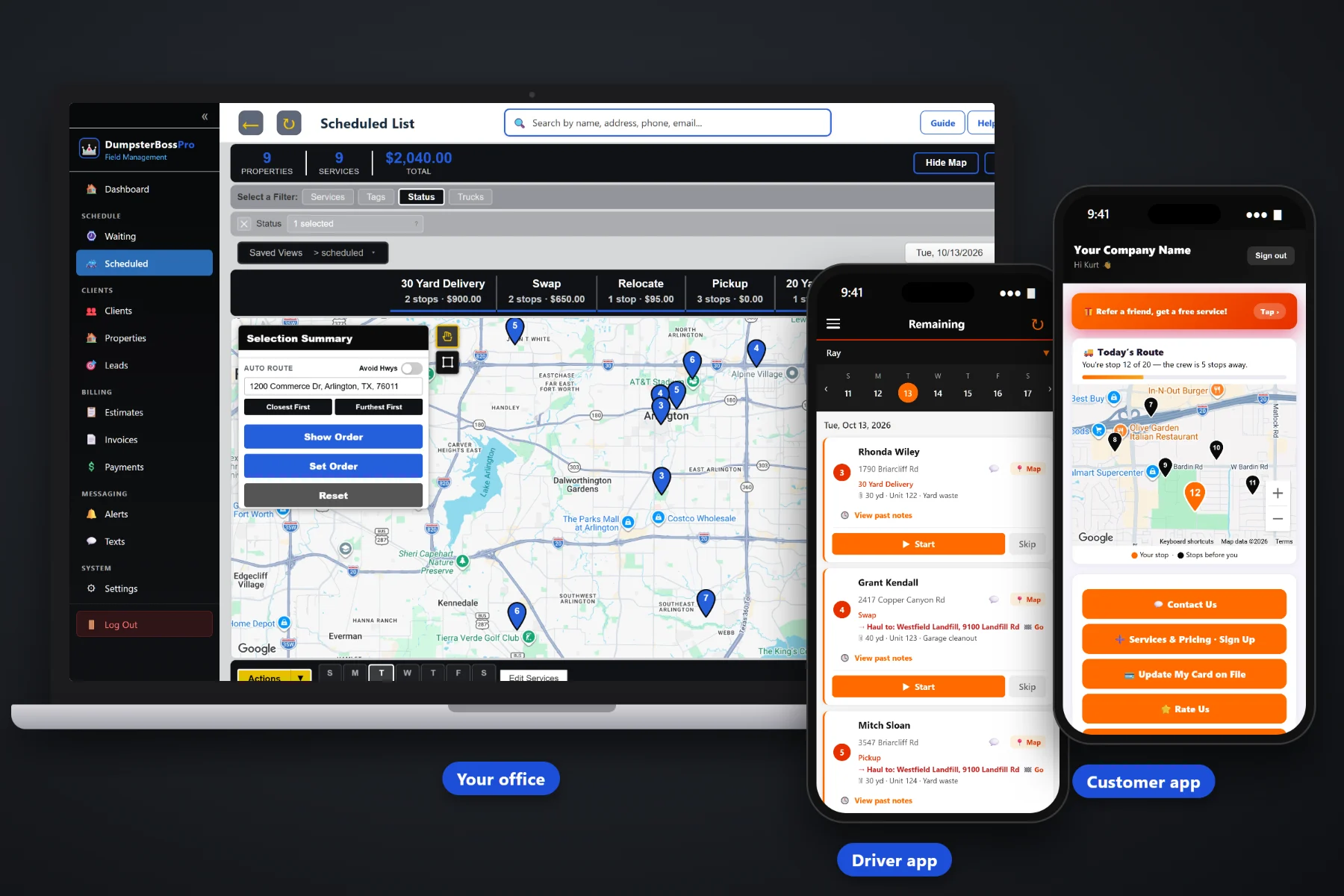
A roll-off driver's day is not one stop after another. It is a can to load at the yard, a customer site and a landfill or transfer station on every pull, a driveway with a car parked where the box goes, and a dispatcher who needs to know which truck is free. DumpsterBossPro puts the jobs in order on the driver's phone, with the site and the haul-to one tap from navigation, the size, unit number and debris type, placement and access notes, placement photos, start and complete, and one-tap on-the-way and arrival texts to the customer.
Plans start at $59/month and you are never billed per user, so every driver, part-timer and busy-season fill-in can have the app. The job list, navigation, dumpster details, photos and customer texts are part of the platform, not an add-on you discover after signing. To see how the driver app fits with dispatch, rental tracking and billing, start at DumpsterBossPro and then dig into the driver's side here.
Each driver sees their own deliveries, swaps and pickups in route order, set by dispatch on the board. Check the list after every complete and keep rolling.
Every job has the customer site and a haul-to landfill or transfer station, and each one opens in navigation with one tap. No retyping addresses in the cab.
Size in yards, unit number and debris type on every job, so the right can goes on the hoist and the right can comes off the site.
Take the placement photos from the app and they stay with the job for the day someone says the can was on the wrong side of the drive.
One tap tells the customer the truck is coming so they move the car, one tap tells them it is there. Replies go to the office.
In the customer app, the customer watches the driver on the way instead of calling the office to ask where their dumpster is.
Whoever booked the job already asked which side of the driveway, whether the customer wants boards, what the gate code is, and what is going in the can. DumpsterBossPro keeps that on the job and puts it in the driver app, so the driver reads it once before rolling instead of calling the office from the curb with a can on the hoist.
Drivers did not get into roll-off to fill out forms on a phone. DumpsterBossPro asks for a few taps per job and gives back the address, the haul-to, the can, the way in and a quieter office phone, so a new driver can learn it on a ride-along.
Set up your employees and trucks, add your customers, and give every driver a login. You are never billed per user.
Pickup, swap and delivery requests land on the Waiting List map. Select them and assign them to a truck and day on the dispatch board.
The dispatch board keeps each truck's jobs by day in route order, with auto-routing, and the driver's phone shows the same order.
Navigate to the site, check the unit number, take placement photos, tap start, send the texts, haul to the landfill and tap complete.
Most field service apps assume one tech drives to one address and parks. A roll-off driver loads a can at the yard, sets it or pulls it on site, and hauls the load to a landfill or transfer station. An app with one address and a notes box leaves half of every job on a scrap of paper on the dash.
Ask any roll-off driver how the day really runs and you will hear the same story: a whiteboard in the yard, a gate code in a text from last week, a group text with three swaps buried under replies. Which 20 on the contractor's site is yours and which one belongs to someone else. Which side of the driveway. Which transfer station takes this load. Which homeowner parked right where the can goes.
That information belongs on the job, not on a sticky note or in one dispatcher's head. When it shows up in the driver app, any driver can run any job and the office stops reading addresses over the phone.
DumpsterBossPro keeps the job, the can, both addresses and the customer in one place, from the first request to the paid invoice.
Every tool here exists to get drivers through a full day of drops, swaps and pulls with fewer phone calls, fewer wrong turns, and no wrong cans on the hoist.
Each driver sees their own jobs in route order, set on the dispatch board, and the list follows when dispatch moves a job.
Customer site and haul-to each open in navigation with one tap, so nobody types a landfill address in a moving truck.
Size in yards, unit number and debris type on every job, visible to the driver before loading at the yard.
Which side of the drive, driveway boards, gate codes, gate hours and where not to drop it, shown with the job.
Photos taken in the app stay with the job for any later question about where the can sat or how the site was left.
Two taps per job tell the office which jobs are underway and which are done and ready to invoice.
One tap each from the driver app. Customers choose which alerts they receive.
The customer app shows the customer a live map of the driver on the way to their drop, swap or pickup.
Customer replies about a new spot or a changed gate code land with the office, tied to the customer.
Drivers clock in and out, so hours are recorded as they happen instead of rebuilt from memory on Friday.
Assign jobs to a truck and day from the Waiting List map, for as many trucks as you run.
Delivery, Pickup, Swap, Dump & Return, and Relocate, with 10, 15, 20, 30 and 40 yard cans.
Days included and a daily rate after, with extra days invoiced automatically.
Scale-ticket weight entered on the job, with overage billed per ton.
Completed jobs become invoices. Charge the card on file, take online payments, and bill contractor accounts monthly.
Every driver gets the app. Plans are Start $59, Pro $89, and Crew $199 per month, not a per-seat charge.
The driver's list starts on the dispatch board. Pickup, swap and delivery requests land on the Waiting List map, the dispatcher assigns them to a truck and day, and the board keeps each truck's jobs in route order with auto-routing. When a contractor calls at 10am for a same-day swap, dispatch fits it in where the truck has the right empty, and the driver sees the new order on the phone. For a full walkthrough of the driver's day, read Dumpster Driver App: The Complete Guide for Roll-Off Companies and Their Drivers.
A homeowner waiting on a dumpster has one question, and a contractor with a crew standing around has the same one louder. The driver taps once for on-the-way and once for arrival, customers choose the alerts they want, and the customer app shows a live map of the driver on the way. Replies come back to the office through two-way texting, and afterward the invoice, online payment, card on file and a button to request a pickup or swap are all in the customer app.
Pick the plan that fits your operation. Every plan starts with a 14-day free trial and no credit card.
Compare plans on the pricing page.
Their jobs in order, each with a customer site and a haul-to address that open in navigation with one tap, the dumpster details (size in yards, unit number and debris type), and placement and access notes such as driveway boards and gate codes. They tap start and complete, take placement photos, and send one-tap on-the-way and arrival texts.
Pickup, swap and delivery requests land on the Waiting List map. The dispatcher assigns them to a truck and day on the dispatch board, in route order with auto-routing, and they show up on the driver's phone in the same order.
One-tap on-the-way and arrival texts from the driver, a live map of the driver on the way in the customer app, and two-way texting with the office. Customers choose which alerts they receive, and they can see invoices, pay online, keep a card on file and request a service in the customer app.
Delivery, Pickup, Swap, Dump & Return, and Relocate, with 10, 15, 20, 30 and 40 yard dumpsters. Rental tracking covers the days included and a daily rate after, with extra days invoiced automatically, and the scale-ticket weight entered on the job bills overage per ton.
Yes. DumpsterBossPro includes employees, trucks and a time clock, so drivers clock in and out and hours are recorded as they happen.
Start is $59/month, Pro is $89/month, and Crew is $199/month. You are never billed per user, so every driver gets the app, and every plan starts with a 14-day free trial with no credit card.
The driver app is one piece of how DumpsterBossPro runs a roll-off company. For dispatch, rental tracking, contractor accounts and billing, see the full platform overview.
Practical reading on the driver's job list, site and haul-to navigation, dumpster details, placement notes and photos, customer texts, the live map, and the time clock.
Jobs in order, site and haul-to navigation, dumpster details, placement photos and one-tap customer texts on every driver's phone. Try DumpsterBossPro free for 14 days.