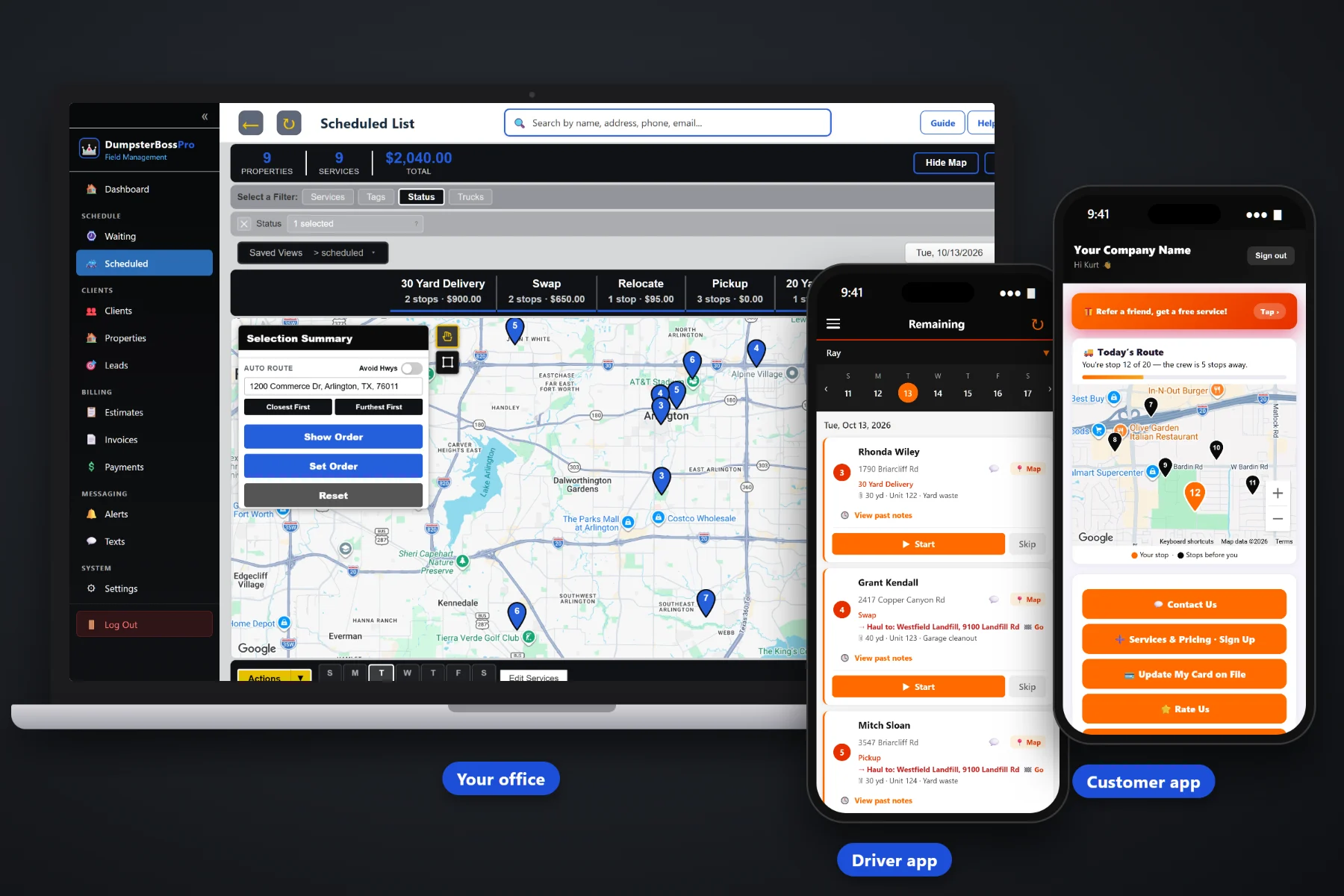
A builder does not rent one dumpster. They rent one on every job they have going. DumpsterBossPro keeps the whole relationship on one account — every job site with its contact and access notes, every swap and pickup request, every scale ticket, and one monthly invoice that lists each job by site so their office can pay it without calling you.
A homeowner cleanout is one drop and one pickup. A roofer, a remodeler, a builder or a property manager is a dozen drops a month, swaps on a schedule and a bookkeeper who wants one bill. DumpsterBossPro is built to keep those accounts organized so they keep calling you first. New here? Start with Contractor Dumpster Rental Software: The Complete Guide to Builder and Commercial Accounts.
Every address a contractor works at lives under their account, so a new job is a new site on a customer you already know.
Swap, pickup and delivery requests land on the Waiting List on a live map and move to a dispatch board by truck.
Placement and access notes and photos in the driver app, so the can goes where the super wants it the first time.
Contractor and commercial accounts billed monthly on one invoice listing every job, with each line naming its job site.
Days included with a daily rate after, extra days invoiced automatically, and scale-ticket weight with overage billed per ton.
Card on file, auto-billing, payment follow-ups, and reports by account to see which contractors carry your business.
When a builder's bookkeeper asks what the Maple Ridge job cost in hauling this month, or a super asks when the last swap happened, the answer should take seconds. DumpsterBossPro keeps each job with its site address, haul-to address, dumpster size, unit number, debris type, rental days and scale-ticket weight, all under the contractor's account. Credit terms, contracts and purchase orders stay in your own process — DumpsterBossPro keeps the jobs and the invoices straight.
A busy builder can open three jobs and request four swaps before lunch. DumpsterBossPro keeps each step short, so the account stays accurate while the trucks keep moving.
Export your customer list from your old system or spreadsheet and bring it in with the CSV import. Names, phones and addresses are enough to start booking jobs.
Mark your builders, roofers, remodelers and property managers for monthly billing, add their job sites, tags and the custom fields their office asks for.
Each drop, swap and pickup carries its site address, haul-to address, size, unit number, debris type and access notes for the driver.
Rental days, extra days and per-ton overage land on the job. At month end the account gets one invoice listing every job by site.
Contractor work is the steadiest work a roll-off company gets. It is also the easiest to fumble, because it is spread across many sites, many people and a whole month of jobs.
The super texts the owner for a swap at the Oak Hill job. The owner is driving. By the time it reaches dispatch it is the afternoon, the framers have stacked debris beside a full can, and the super is calling another hauler for the next one.
At month end the builder's bookkeeper gets eleven separate invoices, two without a job site on them and one missing the extra days. She sets the whole stack aside until someone explains it, and your biggest account pays forty days late.
DumpsterBossPro puts the sites, the notes, the requests and the jobs on the account, gets swaps in front of dispatch fast and sends one clear monthly invoice that names every job site.
Every tool ties back to the same account, so what you learn on one job site shows up on the next drop, in the driver app and on the monthly invoice.
Builders, roofers, remodelers, property managers and other commercial customers, each billed monthly with their jobs kept under the account.
One customer, as many job sites as they run. Each site keeps its address and notes, and every job names the site it belongs to.
Pickup, swap and delivery requests on a live map, then on a dispatch board by truck so every driver knows the day.
Every job carries where the can sits and where the load goes, so drivers never guess which facility a debris type belongs at.
Size, unit number and debris type on every job, so the right can goes out and the right can comes back.
Days included and a daily rate after. Extra days are invoiced automatically when a can sits past its window.
Enter the scale-ticket weight on the job and overage is billed per ton on the invoice.
Placement and access notes, photos at drop and pickup, and the next stop in order for every driver.
Contractors request service, see invoices, pay online, keep a card on file, watch the live driver map and choose their alerts.
Delivery, swap and pickup notices go out on their own, so supers know the truck is coming without calling.
Supers and project managers text your office and replies land next to the account, visible to everyone on shift.
Quote a new contractor or a big project and let them approve online instead of by phone tag.
One invoice per account per month listing every job, each line naming its job site, with sales tax applied.
Charge the card on file automatically, take online payments and send payment follow-ups on anything still open.
Tag accounts as builder, roofer, remodeler or property manager, by area or by priority, then pull the list when you need it.
Job numbers, superintendent names, billing contacts and anything else a contractor office asks you to track.
Jobs, invoiced and paid by account, so you know which contractors are growing and which have gone quiet.
Bring your customer list in from a spreadsheet or old system instead of retyping every contractor.
Dispatchers, drivers and billing staff get their own users and roles without your bill climbing.
Every contractor rents differently. Builders want a can on every lot, roofers want fast turnarounds and heavy loads hauled the same day, remodelers need careful driveway placements, and property managers need cleanouts across many addresses. DumpsterBossPro organizes all of them the same way: the account, its job sites, and its jobs and invoices underneath. For the full walkthrough, read Contractor Dumpster Rental Software: The Complete Guide to Builder and Commercial Accounts.
A new builder asks for pricing, and the quote goes out for online approval. The first drop goes to the driver with the site address, haul-to address, size and access notes. The super requests swaps from the customer app or by text, watches the truck on the live map and gets a notice when it is on the way. At month end the office gets one invoice that names every job site, charged to the card on file or paid online.
Add every dispatcher, driver and office person without your bill climbing. Every plan starts with a 14-day free trial and no credit card.
Compare everything included on each plan on the pricing page.
Practical guides on job sites, site contacts, scheduled swaps, rental days and tonnage, monthly invoicing, card on file, the customer app, tags, reports and keeping contractors coming back.
Yes. A customer can have multiple job sites, and every job carries its own site address and haul-to address. A builder with six projects is one account with six sites, not six customers.
Contractor and commercial accounts are billed monthly with one invoice that lists all of their jobs, and each line names its job site. Extra rental days and per-ton overage from scale tickets are included on the job, and sales tax is applied.
Yes. In the customer app a contractor can request a service, see invoices, pay online, keep a card on file, watch the live driver map and choose their alerts. Requests land on your Waiting List, and two-way texting works for supers who would rather text.
No. DumpsterBossPro does not manage credit limits, contracts or purchase-order approvals, and it does not track container locations by GPS. You can store a job number or billing note in a custom field, and the jobs, invoices and payments stay organized under the account.
Yes. Export your customers from your old system or spreadsheet and bring them in with the CSV import, then add job sites, tags and custom fields for your contractor accounts. Placement, debris and disposal rules vary by city and county, so check your local requirements.
Plans are Start at $59/month, Pro at $89/month and Crew at $199/month. You are never billed per user, and every plan starts with a 14-day free trial with no credit card required.
Contractor accounts are one part of DumpsterBossPro, alongside dispatch, the driver app, rental days and tonnage billing, and the customer app. See the full platform overview.
Keep every contractor account, job site, swap and monthly invoice in one place, keep supers informed and see which accounts are growing with DumpsterBossPro. Try it free for 14 days.